Moin.Schule
Schulconnex
What is Schulconnex?
Schulconnex is an interface (API) for the synchronization of identities and school context data. Contextual data includes roles, group memberships, subjects, a school number, or information about educational programs.
moin.schule and Schulconnex
moin.schule implements Schulconnex. SVS communicates with moin.schule via Schulconnex.
SVS calls the following Schulconnex-endpoints:
- person-info
- policies-info
Latest working version
For Schulconnex documentation see: https://schulconnex.github.io/Schulconnex/
Backchannel Logout from SVS to moin.schule
Whenever a user logs out of the SVS we want to log the user also out of moin.schule as well. This can be done by sending the session token from moin.schule to their Keycloak when we process the users logout from SVS.
To achieve this we need to port some code and expand on it:
- Move the Logout Endpoint to NestJs
- Save the refresh token from moin.schule
- Keep the refresh token alive
- Send the refresh token to Keycloak for logout
Lets go over them all one-by-one
Migrate the Logout to NestJs
Logout is currently handled by the legacy server. We need to migrate the mechanism to NestJs. SVS logout works by unlisting the users JWT from the whitelist and clearing the cookie. The cookie clearing is done by the client, however the server deletes the JWT from the whitelist. The code to migrate is located here. The linked hook is executed the route DELETE /api/v1/authentication. Thus we should create a similar endpoint in the authentication module. We already have all necessary infrastructure to access Redis in NestJs inside the CacheModule.
Save the refresh token from moin.schule
When we call the token endpoint from moin.schule, we already receive the needed refresh token. This token just needs to be saved for the session in the server. We can use the current CacheWrapperModule to access Redis (Later this will be MongoDB, DevOps would appreciate this more, but this is very likely out-of-scope) and save the token there, similar to the SVS-JWT in the whitelist. The token itself has only a limited TTL, which is saved inside the token itself. I would argue that the token itself is saved with the token for easier access:
| Key | Value |
|---|---|
{userId}:{systemId}:refreshtoken | { token: {moin.schule refreshtoken}, ttl:{refreshtoken.ttl} } |
To keep the session store clean, we should give the entry a reasonable TTL
Keep the refresh token alive
The biggest challenge is to keep the token alive without overwhelming the system. A refresh token has only a limited lifetime and this needs to be updated regularly. As a first attempt we want to update the token whenever the user is authenticated against the SVS. The JWT Guard we are using can also be used to check on such information. A possible entry point for this is https://github.com/hpi-schul-cloud/schulcloud-server/blob/f454a653ada922422914bcaf6b341e08f26b3051/apps/server/src/modules/authentication/strategy/jwt.strategy.ts#L12, which checks the JWT.
The necessary steps to expand it are:
- Create a Service for checking the refresh_token
- This Service checks if the user is an external/moin.schule user
- If it is, then check if a refresh_token is available
- If the token has a TTL shorter than a specified time (probable through a global setting or ENV-VAR), then trigger a refresh
- Call to the external system to update the refresh_token
- Use the already saved token endpoint in the OauthConfig of the system
- The required call is as follows:
Method: POST
URL: <token-endpoint>
Body type: x-www-form-urlencoded
Form fields:
client_id : <my-client-name>
grant_type : refresh_token
refresh_token: <my-refresh-token>
The response is a complete new set of tokens though, we only save the refresh token though, as we have currently no use for the other tokens. The new token and TTL are saved in the store as mentioned in the section above.
Send the refresh token to Keycloak for logout
Finally, to facilitate the logout we need to send the refresh token to the Keycloak. It requires the SVS to send the token to the dedicated logout endpoint of the provider. We should already save that endpoint inside our OAuthConfig for the provider.
To log the user out of the Keycloak system we send a request similar to this:
Method: POST
URL: <logout-endpoint>
Header:
	Auth:
		username: <clientId>
		password: <clientSecret>
Body type: x-www-form-urlencoded
Form fields:
refresh_token: <my-refresh-token>
Possible return values:
- 204 if successful
- 400 with a detailed JSON message if not
The response should not concern our functionality of the SVS logout. It is to be determined if the response matters to us, but for now we can reject it.
Refresh the refresh token
Not implemented
Logout from moin.schule initiated in SVS
To have a clean logout for the users, we need to log the user out from moin.schule whenever they are logged out from the SVS. This can be achieved using a Keycloak-specific variant of RP-initiated Logout. A common method in the OIDC standard to tell an Identity Provider that a user should be logged out.
Moin.Schule offers the specified end_session_endpoints (Retrieved on 20.03.2024):
Staging: https://auth.stage.niedersachsen-login.schule/realms/SANIS/protocol/openid-connect/logout
Prod: https://auth.moin.schule/realms/moins/protocol/openid-connect/logout
We also receive already the session token, however we currently discard it. Thus we have all required data present.
The general flow would be as follows:
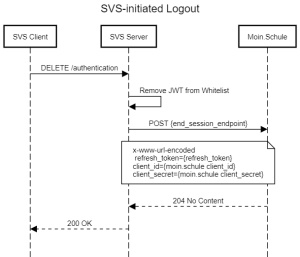
Required changes to resolve the acceptens criteria.
Logout from SVS initiated in moin.schule
Whenever a User logs out of moin.schule, we also want the user to be able to log out of the SVS as well, if they are logged in there through moin.schule. For this there exists the "OP-initiated Logout-Flow" in the OpenId Connect specification. moin.schule supports this through the underlying Keycloak. SVS on the other hand cannot handle this request yet. We need to integrate this into SVS according to the standard.
Flow overview
- The User logs out of moin.schule
- moin.schule sends a Logout-JWT to all connected Clients, including SVS
- SVS verifies the Logout-JWT
- SVS logs the user out and returns OK to moin.schule
Graphical Flow

Validation Steps
According to the OIDC Standard, these are the steps required to validate the Logout-JWT:
- If the Logout Token is encrypted, decrypt it using the keys and algorithms that the Client specified during Registration that the OP was to use to encrypt ID Tokens. If ID Token encryption was negotiated with the OP at Registration time and the Logout Token is not encrypted, the RP SHOULD reject it.
- Validate the Logout Token signature in the same way that an ID Token signature is validated, with the following refinements.
- Validate the
alg(algorithm) Header Parameter in the same way it is validated for ID Tokens. Like ID Tokens, selection of the algorithm used is governed by theid_token_signing_alg_values_supportedDiscovery parameter and theid_token_signed_response_algRegistration parameter when they are used; otherwise, the value SHOULD be the default ofRS256. Additionally, analgwith the valuenoneMUST NOT be used for Logout Tokens. - Validate the
iss,aud,iat, andexpClaims in the same way they are validated in ID Tokens. - Verify that the Logout Token contains a
subClaim, asidClaim, or both. - Verify that the Logout Token contains an
eventsClaim whose value is JSON object containing the member name http://schemas.openid.net/event/backchannel-logout. - Verify that the Logout Token does not contain a
nonceClaim.
We can already do all these points, except for 3 and 4. We do not save these information for the login of the user. We can implement these at a later point, since the other points should give us enough security to log out the user reliably.
Points 1 and 2 are already handled by the ID Token validation we implemented. we can reuse it verbatim. 5-7 are simply checking for claims in the JWT and can be easily implemented.
Endpoint Design
Finally we need to create a new logout endpoint, more precisely an OIDC logout endpoint. This Endpoint needs to be a public POST route with no Authentication that expects exactly one parameter, the logout token. The Endpoint, according to official documentation, should look like this:
POST /backchannel_logout HTTP/1.1
Host: rp.example.org
Content-Type: application/x-www-form-urlencoded

logout_token=eyJhbGci ... .eyJpc3Mi ... .T3BlbklE ...
We need to decide where to put this Endpoint. my suggestion would be to place it in the Authentication module in a new controller especially for logouts. I suggest /api/v3/logout/oidc and in general create a fitting controller for future logout methods (such as the local logout)